Facebook

Showing posts with label 11gR2. Show all posts

Thursday, November 6, 2014

OAM 11.1.2.2 (11gR2) - System error after submitting credentials from Custom Login Page

Scenario : Standard Custom Login Page doing form post to /oam/server/auth_cred_submit with username/pwd and 'request_id' in cookie.

Issue - Sporadic redirection to an error page with 'System Error has occurred' message with details -
[oam_server1] [TRACE] [] [oracle.oam.binding] [tid: [ACTIVE].ExecuteThread: '3' for queue: 'weblogic.kernel.Default (self-tuning)'] [userId: ] [ecid: 004sto37QpzDoYX5HvH7if00063I00002b,0:2] [SRC_CLASS: oracle.security.am.pbl.protocol.plugin.oam.AMFailureResponseHandler] [APP: oam_server#11.1.2.0.0] [SRC_METHOD: processResponse] [URI: /oam/server/auth_cred_submit] OAM-02073[[
oracle.security.am.common.utilities.exception.AmRuntimeException: OAM-02073
at oracle.security.am.engines.enginecontroller.AuthzEngineController.checkProtected(AuthzEngineController.java:438)
at oracle.security.am.engines.enginecontroller.AuthzEngineController.processEvent(AuthzEngineController.java:177)
at oracle.security.am.controller.MasterController.processEvent(MasterController.java:570)
at oracle.security.am.controller.MasterController.processRequest(MasterController.java:759)


Solution
"Verify that the custom login page is submitting the credentials to /oam/server/auth_cred_submit with the correct OAM Server Host and Port.The OAM_SERVER_HOST.DOMAIN and SSLPORT values should match those configured in the OAM Console -> System Configuration -> Access Manager Settings page for Load Balancing OAM Server Host and OAM Server Port.

In  my case, the form post URL was pointing to https://<host>/oam/server/auth_cred_submit.
Once I had it changed to https://<host>:443/oam/server/auth_cred_submit, (adding missing port) this issue got resolved.

Please check the above support document for some other causes for this issue.

Monday, October 6, 2014

OAM 11gR2 : Single-Sign-On to an internal Portal, logging in from an external facing public Portal

A common requirement for many Portal clients -
Allow single signed on access to an Internal Portal, with the user logging in from an external portal using a custom login form (one at the top right corner of the screen).
Why is this not straight forward ?
Well, you might ask what's the big deal with this. Isn't this a standard custom login page being implemented ? Nope, a standard OAM Custom Login page posts to the /oam/server/auth_cred_submit URL endpoint alongwith request_id as a parameter which contains the details of the protected resource to which it should navigate on successful authentication. In short, the protected page was solicited by the user, and after a series of redirects it lands at the custom login page. Once the user authenticates successfully, the resource is picked up from the request_id parameter and navigated to.
In the above scenario, the user needs to navigate to a resource which was not solicited.e.g. The user requested for  www.oracle.com and after logging in needs to navigate to oracle.com/EmployeePortal.
This introduces the concept of Unsolicited Login -
Unsolicited Login is used when we want to authenticate user without any request_id or resource. The page which is navigated to, upon successful authentication is not the one which was initially solicited hence the name Unsolicited Login.
This feature has been introduced by Oracle in 11gR2 (11.1.2.x series). Prior to 11gR2, this feature would need to be custom built.

Following are the steps needed to enable this feature in OAM :
1. Enable Direct Authentication for OAM.
Navigate to OAM Domain for your installation, under config/fmwconfig/oam-config.xml, ensure that ServiceStatus under DirectAuthenticationServiceDescriptor is set to true. (DirectAuthenticationServiceDescriptor is under OAMServicesDescriptor).

It is highly recommended that, you first stop the Admin Server and OAM Cluster before you make any changes to the oam-config.xml. Further, it is sufficient to do the above changes in the oam-config.xml under the AdminServer/config/fmwconfig incrementing the Version field by 1. Once you have restarted the AdminServer and the OAM Clusters, the oam-config.xml for OAM Cluster will get automatically updated.
2. Submit the following information to the endpoint via Custom Login Form (External Public facing Portal Page) https://oam_host:oam_port/oam/server/authentication:
a.      username
b.      password
c.       successurl, for example, http://machinename.mycompany.com:7778/sample-web/headers.jsp.
Code Example
<form id="loginForm" name="loginForm" action="http://OAMHost:Port/oam/server/authentication" method="post" hidden="true" >
<input id="username" type="text" name="username" />
<input id="password" type="password" name="password" />
<input id="successurl" type="text" name="successurl" value="http://chinni-pc:7777/"/>
<input type="submit" value="submit" />
</form>
You can use the above code bit in a JSP and package it within the same Custom Login Page app archive used for the Internal Portal. This will need to be re-deployed to the Weblogic Server for the functionality to work.
 In case you would like to use it in an external Portal page which is an HTML or the like you can iframe the above code as a JSP.
Once the credentials are validated, OAM Server redirects to the success URL after setting OAM_ID cookie as part of HTTP redirect (HTTP response code 302).
Note – Internal Portal Login page or code does not need to be changed.
3. To allow direct authentication only for POST, or vice-versa:
i)        Login to Oracle Access Management administration console and navigate to Policy Configuration, then Application Domains.
ii)      Select edit default application domain IAMSuite. Navigate to Resources, then search and edit resource /oamDirectAuthentication.
iii)    Under Operations, de-select all operations that are not to be supported, except POST. For example, GET, DELETE.
iv)    Make sure that the AuthenticationPolicy for the /oamDirectAuthentication points to the same AuthenticationScheme as for the Internal Portal.
If the above is not present in your OAM environment, please create it similar to the screenshots below.

Once user logs in, user will be redirected to successurl.

4. The URL pattern of the external Public facing Portal needs to be marked as ‘Unprotected’ with a ‘PublicAuthenticationPolicy’ which uses an ‘Anonymous Scheme’.
The internal Portal would continue to be as-it-is marked ‘Protected’ with a ‘PrivateAuthenticationPolicy’ pointing to the relevant ‘LDAPScheme’.

The above would need to be done within the appropriate ‘Application Domain’ which is used for the Portal.

In screenshot below, /ssologin/.../* represents the URL pattern for an External public facing Portal.

Oracle Documentation References
Screenshots from a POC on this
Below are the screenshots and summary from a POC done on OAM 11.1.2.2 with WebCenter Portal/Spaces 11.1.1.8.3 as the Success URL.

The below screenshot represents a public site with a login form. This page is not protected and is meant to represent an external portal.
Once the user enters the required credentials and clicks submit, they will be redirected to a protected resource. The protected resource shown below (WebCenter) is to reflect a protected internal portal.
Shown above, the user has successfully authenticated and has established an SSO session with Oracle Access Manager.
If the protected resource is accessed directly, a separate authentication method/form will be used to challenge the user. 

Friday, September 26, 2014

Oracle Fusion Middleware : 11.1.1.x / 11gR1 Support

Your 11gR1(11.1.1.x) customer does not wish to upgrade to 11gR2 (11.1.2.x) or to 12c (12.1.x) as he probably is not too keen on the new features or is not excited about the cloud yet.

Well, what about support on 11gR1 ? This can be a major factor for upgrade apart from new features!

11.1.1.x Premier support ends June 2015
As per http://www.oracle.com/us/support/library/lifetime-support-middleware-069163.pdf page 36

Note there are three kinds of support - Premier Support, Extended Support and Lifetime Support.
The extended support may not support integrations with new third party vendors and the sustaining support does not include new fixes!

Typically premier support is for 5 years since the launch of the product, extended support for 2 more years and sustaining support thereafter.

Saturday, August 23, 2014

Oracle IDM 11gR2 : Integrating with MS Active Directory 2003

The latest versions of OIM and OAM 11gR2(11.1.2.x) donot support LDAP Sync or OIM-OAM Integration using Active Directory(AD) 2003 as per the 11gr2 certification matrix
We had a use case to support federation using OAM 11gR2 somehow with AD 2003 as the Identity Store. 

Option 1 : Using OVD
We noticed that the latest version of OVD was 11.1.1.7 which happens to support AD 2003 as per the 11gR1 FMW certification matrix .So potentially we could hook OAM with OVD as the Identity Store and still connect to Active Directory 2003, which is not directly supported!
Extending this theory we could provision to OVD from OIM which finally would create relevant user accounts in Active Directory 2003!!
Oracle confirmed this in SR # 3-9503114871(you may not be able to view it directly but can refer to this in another SR if need be).

Option 2 : Using OID and DIP
Standup OID(11.1.1.7 is the latest as of today) and sync existing users from AD 2003 using a DIP process.

Option 3 : Use IDM 11gR1
Least preferred since it's never a good idea to go back to a older release when the newer release has so much to offer and IDM 12c is in the pipeline.If none of the above can be made to work for whatever reasons, AD 2003 is definitely supported both with OIM and OAM 11gR1(11.1.1.x).

Monday, August 11, 2014

OAM 11gR2 : 500 Internal Server Error after registering new 11g Webgate

I got the error as in the subject after I had registered a new webgate , done other necessary configurations and tried to access a WebCenter Portal page which I was trying to protect.

The error in the oblog.log said - 


Request Failed for : /index.html, Resp Code : [500]
OBWebGate_AuthnAndAuthz: Cannot get message for ObAccessException_NO_AGENT_KEY


Oracle Support had a similar issue for Fusion Apps which didnot really help -
https://support.oracle.com/epmos/faces/DocumentDisplay?id=1534423.1

Finally , after using the OAM Tester , a colleague suggested to edit and re-copy Webgate related files from Output Directory of the OAM_Domain pertaining to the webgate to <OHS_Instance>/config/OHS/ohs1/webgate/config.

Hope this helps someone facing a similar issue.

Thursday, May 22, 2014

Oracle Identity Mgmt 11gR2 PS2 : New features & Cloud / Mobile Strategy

Source - The live webcast on this topic by Oracle. Here are the updates -

"Oracle IdM R2 PS2 Theme  - Cloud , Mobile , Simplification"

New features in 11gR2 PS2 release  -

1) Cloud Access Portal - a web based application has been added in PS2 release which will enable admins to manage SaaS based cloud applications.
  • The login to each application will be using SSO , form-fill technologies & federation capabilities.UI adapts to  various form factors.
  • OAM Protects the resources
  • When clicked on apps , redirection to logjn page with form fill and auto login.

2)Session Management features in Oracle Privileged Account Manager (OPAM) - 

OPAM is a whole new set of functionality focused on managing administrative passwords for applications, databases and operating systems.

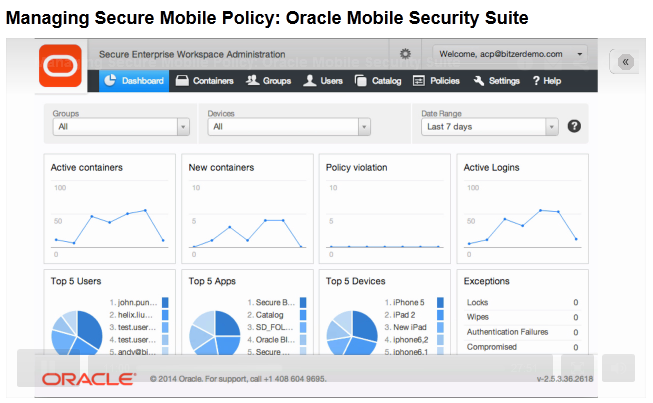
3) Oracle Mobile Security Suite (OMSS) -

This heavily leverages features and concepts from Oracle's Bitzer acquistion . This is a MAM (Mobile Application Management) solution.
  • The onus is on application centric security as opposed to device centric security.
  • Introduces a new concept called the Secure Mobile Workspace which containerizes all corporate applications with a single login .
  • Builds on the BYOD concept where in employees can use their personal devices / phablets to access corporate apps/data.
  • Fine grained policy control using Oracle Mobile Access/Admin Console with new features like geo-fencing , time-bound access to workspace etc.
  • Enterprise wide Identity management solution is extended to mobile devices
  • Oracle API Gateway (OAG) support for RESTful IdM services.
  • DLP Support
  • Core apps for Email, Calendar, Contacts, Tasks, Notes.

4) Oracle Mobile Authenticator

  • Adds strong authentication features for SSO enabled apps
  • Uses changing PIN every 30 seconds for registered apps
  • Integration with OAM
  • Available on Android and iOS

5) Improved & fully integrated OAuth 2.0 Support for authorization -client , server , 2 legged or 3 legged authorization.

6) Automated IdM Suite install
  • 2 hours for single node  , 8 hours for 8 node HA cluster.
  • Patching support
  • Standard builds
  • No additional license needed , feature is supposedly OTB using Wizards and components to be installed can be configured.

General 11gR2 IdM strategy from Oracle
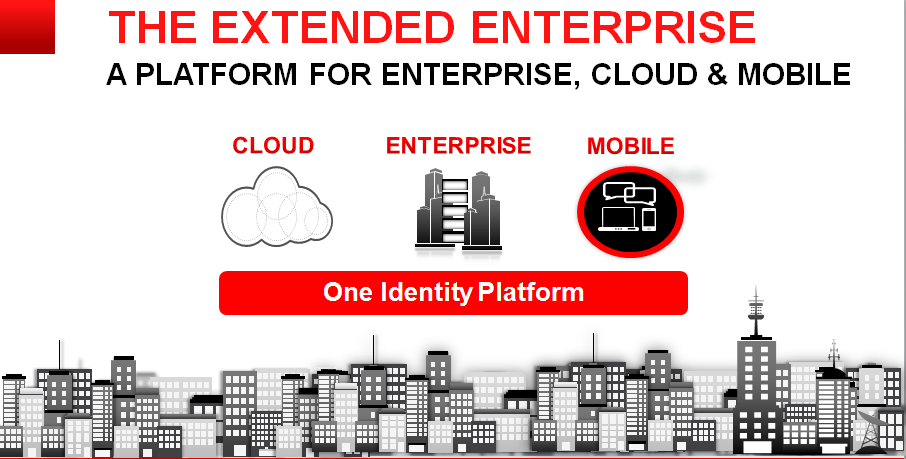
To provide a unified Identity Management platform for Cloud , Enterprise and Mobile Applications.

Useful Links

P.S. Source of images Oracle Webcast , intention only to share the information.

Oracle Mobile Security Suite (OMSS)

Oracle launched OMSS on Feb 26th , 2014 and had a webcast few days back detailing its features. Here are few details - 
Overview -
Oracle Mobile Security Suite (OMSS) addresses the BYOD challenges by isolating corporate from personal data on consumers’ personal mobile devices without
needing to lockdown the entire device.
Oracle’s Mobile Security Container technology protects corporate apps and data and enables a Secure Enterprise Workspace that meets enterprise security
requirements without compromising user experience. It offers the most integrated solution with Windows® authentication and Oracle Access Manager
infrastructure for secure Single Sign-on (SSO) to corporate applications.

The entire solution includes -
1)A BYOD,employee-centric mobile security suite that separates personal apps from secure,“containerized” corporate
,“off-the-shelf” apps and data avoiding device lock-down.Containerized apps are Oracle and/or third -party enterprise
applications accessed by employees through the corporate network(intranet).
2) A consumer - centric mobile and social service that provides a software development kit (SDK) allowing corporate
developers to secure custom enterprise apps for Apple’s iOS and Google’s Android devices, bridging the gap between mobile devices,
social networks, and the enterprise’s backend identity management infrastructure.

Key Identifiers -

1)Comprehensive set of security policies providing strong authentication, encryption and DLP (Data Leak Prevention) controls .
2)Containerization (apps are containerized and only one time login into a container is needed).
2)Secure Enterprise Workspace which houses all the corporate apps.

3)Single Sign-on (SSO) with Integrated Windows Authentication (Kerberos and NTLM) and OAM authentication (Basic Auth and OAuth 2.0) 
4)AppTunnel that eliminates need for mobile VPN and protects from rogue apps.
5)Mobile Security Access Server is located in the DMZ which redirects unauthenticated requests to appropriate Oracle Mobile Security containers.
7)Mobile Security Admin Console for Locking , providing access , remote wipe of corporate container.
8)New and useful features like geo-fencing and time-fencing available in admin console.
9)Leverages the existing IDM Architecture - talks to Directory Services(OID/OUD/AD) , apps can be protected by OAM and/or OIF.


10)Container has OOTB apps like Secure Browser , Catalog , Mail Mgr etc.
11)OMSS can be deployed on Oracle Enterprise Linux or Microsoft Windows.
12)Android 4.x and above including 4.4/KitKat compatibility
13)The Oracle Mobile Security Suite components are distributed across the corporate DMZ and the enterprise intranet (or corporate network)
14)This is a mobile application management (MAM) solution which has various advantages over MDM(Mobile Device Mgmt) solutions like Airwatch
like separate container for coprporate apps , no requirement of device locking , data privacy etc.

Architecture - 
The recently rechristened Oracle MAF is tightly integrated with OMSS.

Useful Links -
P.S. Source of images Oracle Webcast , intention only to share the information.