Facebook

Showing posts with label portal. Show all posts

Thursday, November 6, 2014

OAM 11gR2 / 11.1.2.2 : Redirection to favicon.ico screen after authentication to a Portal

Scenario After login to the Portal using OAM 11gR2PS2 login to access a protected resource for the first time (page not cached in browser), the end user is redirected to the favicon.ico url instead of the resource url. The browser needs to be refreshed with the Portal URL to get this to navigate to the Portal home page as expected.

Also if the favicon.ico is not present in the OHS /htdocs folder a 404 may also appear.

It was initially tricky to figure out that this issue was related to permissions in OAM. But if we remove the webgate entry from httpd.conf (i.e. Security layer is bypassed), we can confirm that this issue doesnot occur which means OAM is playing up here.

Cause -
This is caused by the favicon.ico being protected by OAM. 
If it's not in the browser cache, the client browser will fetch the favicon.ico resource on the server. It will get the favicon before the page, setting incorrectly the end_url parameter, redirecting to the favicon url instead of the resource url.


Solution -
Make sure that favicon.ico is created in <OHS_INSTANCE>/config/OHS/ohs1/htdocs/  folder so that there is no 404 ever. This is the icon which shows besides the website address.

Then, create a resource definition in OAM as documented in http://docs.oracle.com/cd/E27559_01/admin.1112/e27239/app_domn.htm#CACJJGCA 
1) set type as HTTP
2) define resource URL to /favicon.ico
3) set protection level to "excluded"  (More about excluded resources here )


Reference - Oracle Support Document 

Monday, October 6, 2014

OAM 11gR2 : Single-Sign-On to an internal Portal, logging in from an external facing public Portal

A common requirement for many Portal clients -
Allow single signed on access to an Internal Portal, with the user logging in from an external portal using a custom login form (one at the top right corner of the screen).
Why is this not straight forward ?
Well, you might ask what's the big deal with this. Isn't this a standard custom login page being implemented ? Nope, a standard OAM Custom Login page posts to the /oam/server/auth_cred_submit URL endpoint alongwith request_id as a parameter which contains the details of the protected resource to which it should navigate on successful authentication. In short, the protected page was solicited by the user, and after a series of redirects it lands at the custom login page. Once the user authenticates successfully, the resource is picked up from the request_id parameter and navigated to.
In the above scenario, the user needs to navigate to a resource which was not solicited.e.g. The user requested for  www.oracle.com and after logging in needs to navigate to oracle.com/EmployeePortal.
This introduces the concept of Unsolicited Login -
Unsolicited Login is used when we want to authenticate user without any request_id or resource. The page which is navigated to, upon successful authentication is not the one which was initially solicited hence the name Unsolicited Login.
This feature has been introduced by Oracle in 11gR2 (11.1.2.x series). Prior to 11gR2, this feature would need to be custom built.

Following are the steps needed to enable this feature in OAM :
1. Enable Direct Authentication for OAM.
Navigate to OAM Domain for your installation, under config/fmwconfig/oam-config.xml, ensure that ServiceStatus under DirectAuthenticationServiceDescriptor is set to true. (DirectAuthenticationServiceDescriptor is under OAMServicesDescriptor).

It is highly recommended that, you first stop the Admin Server and OAM Cluster before you make any changes to the oam-config.xml. Further, it is sufficient to do the above changes in the oam-config.xml under the AdminServer/config/fmwconfig incrementing the Version field by 1. Once you have restarted the AdminServer and the OAM Clusters, the oam-config.xml for OAM Cluster will get automatically updated.
2. Submit the following information to the endpoint via Custom Login Form (External Public facing Portal Page) https://oam_host:oam_port/oam/server/authentication:
a.      username
b.      password
c.       successurl, for example, http://machinename.mycompany.com:7778/sample-web/headers.jsp.
Code Example
<form id="loginForm" name="loginForm" action="http://OAMHost:Port/oam/server/authentication" method="post" hidden="true" >
<input id="username" type="text" name="username" />
<input id="password" type="password" name="password" />
<input id="successurl" type="text" name="successurl" value="http://chinni-pc:7777/"/>
<input type="submit" value="submit" />
</form>
You can use the above code bit in a JSP and package it within the same Custom Login Page app archive used for the Internal Portal. This will need to be re-deployed to the Weblogic Server for the functionality to work.
 In case you would like to use it in an external Portal page which is an HTML or the like you can iframe the above code as a JSP.
Once the credentials are validated, OAM Server redirects to the success URL after setting OAM_ID cookie as part of HTTP redirect (HTTP response code 302).
Note – Internal Portal Login page or code does not need to be changed.
3. To allow direct authentication only for POST, or vice-versa:
i)        Login to Oracle Access Management administration console and navigate to Policy Configuration, then Application Domains.
ii)      Select edit default application domain IAMSuite. Navigate to Resources, then search and edit resource /oamDirectAuthentication.
iii)    Under Operations, de-select all operations that are not to be supported, except POST. For example, GET, DELETE.
iv)    Make sure that the AuthenticationPolicy for the /oamDirectAuthentication points to the same AuthenticationScheme as for the Internal Portal.
If the above is not present in your OAM environment, please create it similar to the screenshots below.

Once user logs in, user will be redirected to successurl.

4. The URL pattern of the external Public facing Portal needs to be marked as ‘Unprotected’ with a ‘PublicAuthenticationPolicy’ which uses an ‘Anonymous Scheme’.
The internal Portal would continue to be as-it-is marked ‘Protected’ with a ‘PrivateAuthenticationPolicy’ pointing to the relevant ‘LDAPScheme’.

The above would need to be done within the appropriate ‘Application Domain’ which is used for the Portal.

In screenshot below, /ssologin/.../* represents the URL pattern for an External public facing Portal.

Oracle Documentation References
Screenshots from a POC on this
Below are the screenshots and summary from a POC done on OAM 11.1.2.2 with WebCenter Portal/Spaces 11.1.1.8.3 as the Success URL.

The below screenshot represents a public site with a login form. This page is not protected and is meant to represent an external portal.
Once the user enters the required credentials and clicks submit, they will be redirected to a protected resource. The protected resource shown below (WebCenter) is to reflect a protected internal portal.
Shown above, the user has successfully authenticated and has established an SSO session with Oracle Access Manager.
If the protected resource is accessed directly, a separate authentication method/form will be used to challenge the user. 

Friday, September 26, 2014

Oracle Fusion Middleware : 11.1.1.x / 11gR1 Support

Your 11gR1(11.1.1.x) customer does not wish to upgrade to 11gR2 (11.1.2.x) or to 12c (12.1.x) as he probably is not too keen on the new features or is not excited about the cloud yet.

Well, what about support on 11gR1 ? This can be a major factor for upgrade apart from new features!

11.1.1.x Premier support ends June 2015
As per http://www.oracle.com/us/support/library/lifetime-support-middleware-069163.pdf page 36

Note there are three kinds of support - Premier Support, Extended Support and Lifetime Support.
The extended support may not support integrations with new third party vendors and the sustaining support does not include new fixes!

Typically premier support is for 5 years since the launch of the product, extended support for 2 more years and sustaining support thereafter.

Monday, August 25, 2014

OID 11.1.1.7 - Unlocking superuser orcladmin account

We weren't able to login to WebCenter Portal which uses OID as the Authentication store today.
On investigation we found out that the superuser orcladmin account was itself locked.

Note -
1.There are 2 orcladmin accounts: the superuser account, cn=orcladmin, and the REALM administrator cn=orcladmin, for example: cn=orcladmin,cn=users,dc=oracle,dc-com.

2. The superuser account is hard coded and is not seen in the Oracle Directory Manager (ODM), nor the Oracle Directory Services Manager (ODSM) in 11g.


Following commands* executed from a command line tool helped to fix this issue -


export ORACLE_HOME=/u01/app/oracle/middleware/Oracle_IDM1/
export ORACLE_INSTANCE=/u01/app/oracle/admin/OID_Domain/oid_inst_2/
cd /u01/app/oracle/middleware/Oracle_IDM1/ldap/bin
>./oidpasswd connect=OIDDB unlock_su_acct=true      #find connect string from #/u01/app/oracle/admin/OID_Domain/oid_inst1/config/tnsnames.ora
OID DB user password:<ODS Schema pwd>

*This is just a representation of what i had to do in my environment to fix this.

Post this, you would need to login to ODSM, go to Data Browser tab and change the password for cn=orcladmin,cn=Users,dc=<companyName>,dc=com and change the password which in all probability might have expired as well.


Atul Kumar's post here also helps with similar issues.

To change password policies have a look at this Oracle Doc

Tuesday, July 15, 2014

ADF / Webcenter : POJO Data Control caches values even when container taskflow is refreshed [UI Aware Data Model - I]


Oracle says ADF BC , EJBs , Webservices , POJOs etc. are supported as Business Services layer in ADF.

The Data control layer which happens to be the Model layer can be generated from each of the above ( gets generated automatically from ADF BC).


Use Case -
I had a taskflow which contained a jsff as a default view activity. The view in turn pulled data from a Webservice proxy (a POJO for all practical purposes) via a POJO DataControl.We had a requirement to refresh the taskflow when the value of a selectOneChocie outside the region changed .

Issue -
Though the taskflow refreshed but the page showed the same data  within the ADF Table (based on the POJO Data control) which was surprising !

Concern
Since as per the documentation -
http://docs.oracle.com/cd/E21764_01/web.1111/b31974/taskflows_regions.htm#CHDEIFBB
Example 17-8 says :
You do not need to refresh an ADF region to refresh the data controls inside the ADF region. During the ADF lifecycle, the refresh events telling the iterators to update will be propagated to the binding container of the current page of the ADF region.


Solution -
We had to re-execute the iterator's Query to get this to work either as a method call before your view is loaded or by overriding the refreshRegion() method of the Region Controller class.

Explanation - 
The actual reason why this is expected is because the way ADF works with ADF BC as the business services layer and the UI-aware data model aspect from the Oracle documentation. Other non - ADF BC business services implementation donot support this pattern and we would need to refresh iterators programmatically or clear cache's etc to reflect most recent data when using POJO's/ WS Datacontrols etc.

"When you use ADF Business Components in combination with the ADF Model layer and ADF Faces UI components, the data model is "UI aware" because your UI components will automatically update to reflect any changes to the row sets of these business objects
Thus, the UI-aware data model represents a solution that works across application technology layers to ensure that the UI and data model remain synchronized."

Here is the forum thread for reference.

Conclusion
Though many people who have worked in open source platforms and are used to having a handle to the code aren't fans of ADF BC - but ADF BC simplifies development by providing really cool features like the UI Aware Data Model.I would try to outline more in this in another post.


Saturday, July 12, 2014

ADF/Webcenter : High Availability/Failover Configuration

We need to add the following parameters to our config files to enable High Availability in ADF /Webcenter applications.


Specifically ensure the weblogic-application.xml file has the following:
<session-descriptor>
<cookie-path>/appname</cookie-path>
<persistent-store-type>REPLICATED_IF_CLUSTERED</persistent-store-type>
</session-descriptor>

And the adf-config.xml file has the following:
<adf-controller-config xmlns="http://xmlns.oracle.com/adf/controller/config">
<adf-scope-ha-support>true</adf-scope-ha-support>
</adf-controller-config>


Some other factors you should consider at a code level.

ADF/WebCenter : Things to keep in mind while integrating Google Analytics

Download this article here to configure Google Analytics with ADF ( Pretty much similar to integration of GA with JSP)  . This will help you see page views by location , browser

Few Issues I faced & might help you -


2)Enabling IP Address on IWLS -

3)Use Universal Analytics or Basic Classic Analytics (without additional settings) as clearly mentioned here -

Monday, June 9, 2014

Impersonation feature for WebCenter Spaces 11.1.1.8 with Oracle Acess Mgr(OAM) 11gR2

What is Impersonation ? 
WebCenter Portal Impersonation lets a WebCenter Portal administrator or system administrator assign impersonation rights to a group of users ("impersonators"), such as support representatives or application administrators, so that they can impersonate another Portal user and perform operations as that user ("impersonatees"). This may be useful in the following instances:
  • A customer support representative may want to perform actions as another user in order to understand the issues being faced by that user
  • An administrator may want to perform operations on behalf of a user
  • A company executive may need to delegate someone to act on his or her behalf while away. (Source : Oracle Documentation)


Pre-requisites
1) WebCenter Spaces 11.1.1.8 +
2) Oracle Access Manager(OAM) 11.1.2 (11gR2+)
3) Setups need to be done in OAM , Webcenter Spaces application using EM , and in Oracle Internet Directory(OID) for the users (OID 11.1.1.7+)

Key Advantages -
1) Feature just needs to be configured as mentioned above . Effort is markedly less than implementing this feature in a custom manner using ADF/Web Technologies.
2) Feature once configured along with OAM can be monitored using OAM.
3) Out of the box UI are available and supported by Oracle , hence the solution is standardized.
4)Feature being a very common use case can be used to sell OAM and the Security Team has expertise in implementing it within a cpl of weeks.

Note 
  • After weeks of ado , I have got this up and running in our environments for Webcenter Spaces 11.1.1.8 which is Oracle's new way of developing webcenter portal applications.
  • But for a Custom Portal Application in 11.1.1.8, though Security Taskflows for Impersonation are available in Jdeveloper , Impersonation is not currently supported (Doc ID 1606526.1) but I have an ER open with Oracle [BUG 18882638 - ENABLE IMPERSONATION FOR WEBCENTER CUSTOM FRAMEWORK APS ]

Walkthrough of this new & exciting feaute via screenshots - 
1) Screen in WC Spaces / Custom Portal Security Taskflow to select impersonators. (Validations to prevent users not been setup as Impersonators available Out of the Box).


2) Search Impersonators screen .
Only those users who have been granted Impersonator access in OID can be searched here.


3)Selected Impersonator who can be given access rights for a time duration.


4) Once Switch User Link is clicked ( as in second image above) after logging in with the 

Impersonators credentials , the Impersonator is asked to enter your credentials as under.

5) Once logged in the Impersonation session is in progress. Remember - The impersonatee's credentials were not used at all !
Click on Stop Impersonation to return back 
to the Impersonator's home page.
6) Cool feature  !! Monitor the Impersonation session as an Admin in OAM Console as below

Reference 

Thursday, May 22, 2014

Oracle Identity Mgmt 11gR2 PS2 : New features & Cloud / Mobile Strategy

Source - The live webcast on this topic by Oracle. Here are the updates -

"Oracle IdM R2 PS2 Theme  - Cloud , Mobile , Simplification"

New features in 11gR2 PS2 release  -

1) Cloud Access Portal - a web based application has been added in PS2 release which will enable admins to manage SaaS based cloud applications.
  • The login to each application will be using SSO , form-fill technologies & federation capabilities.UI adapts to  various form factors.
  • OAM Protects the resources
  • When clicked on apps , redirection to logjn page with form fill and auto login.

2)Session Management features in Oracle Privileged Account Manager (OPAM) - 

OPAM is a whole new set of functionality focused on managing administrative passwords for applications, databases and operating systems.

3) Oracle Mobile Security Suite (OMSS) -

This heavily leverages features and concepts from Oracle's Bitzer acquistion . This is a MAM (Mobile Application Management) solution.
  • The onus is on application centric security as opposed to device centric security.
  • Introduces a new concept called the Secure Mobile Workspace which containerizes all corporate applications with a single login .
  • Builds on the BYOD concept where in employees can use their personal devices / phablets to access corporate apps/data.
  • Fine grained policy control using Oracle Mobile Access/Admin Console with new features like geo-fencing , time-bound access to workspace etc.
  • Enterprise wide Identity management solution is extended to mobile devices
  • Oracle API Gateway (OAG) support for RESTful IdM services.
  • DLP Support
  • Core apps for Email, Calendar, Contacts, Tasks, Notes.

4) Oracle Mobile Authenticator

  • Adds strong authentication features for SSO enabled apps
  • Uses changing PIN every 30 seconds for registered apps
  • Integration with OAM
  • Available on Android and iOS

5) Improved & fully integrated OAuth 2.0 Support for authorization -client , server , 2 legged or 3 legged authorization.

6) Automated IdM Suite install
  • 2 hours for single node  , 8 hours for 8 node HA cluster.
  • Patching support
  • Standard builds
  • No additional license needed , feature is supposedly OTB using Wizards and components to be installed can be configured.

General 11gR2 IdM strategy from Oracle
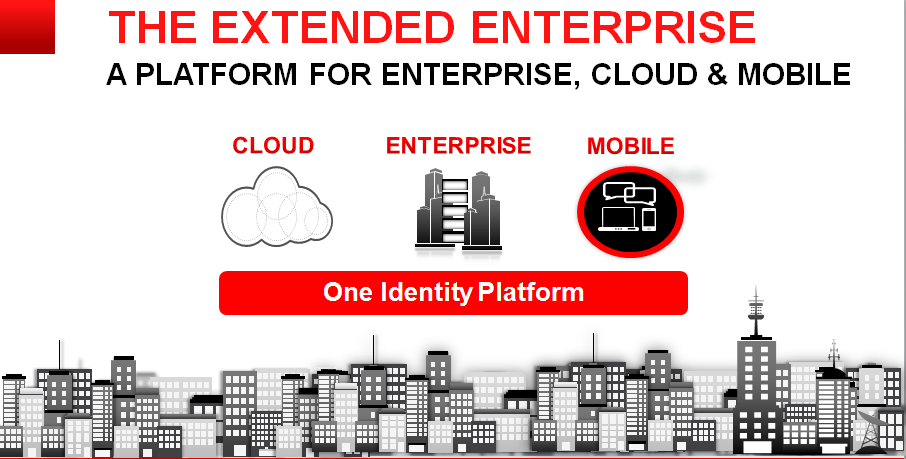
To provide a unified Identity Management platform for Cloud , Enterprise and Mobile Applications.

Useful Links

P.S. Source of images Oracle Webcast , intention only to share the information.