Facebook

Tuesday, July 15, 2014

ADF / Webcenter : POJO Data Control caches values even when container taskflow is refreshed [UI Aware Data Model - I]


Oracle says ADF BC , EJBs , Webservices , POJOs etc. are supported as Business Services layer in ADF.

The Data control layer which happens to be the Model layer can be generated from each of the above ( gets generated automatically from ADF BC).


Use Case -
I had a taskflow which contained a jsff as a default view activity. The view in turn pulled data from a Webservice proxy (a POJO for all practical purposes) via a POJO DataControl.We had a requirement to refresh the taskflow when the value of a selectOneChocie outside the region changed .

Issue -
Though the taskflow refreshed but the page showed the same data  within the ADF Table (based on the POJO Data control) which was surprising !

Concern
Since as per the documentation -
http://docs.oracle.com/cd/E21764_01/web.1111/b31974/taskflows_regions.htm#CHDEIFBB
Example 17-8 says :
You do not need to refresh an ADF region to refresh the data controls inside the ADF region. During the ADF lifecycle, the refresh events telling the iterators to update will be propagated to the binding container of the current page of the ADF region.


Solution -
We had to re-execute the iterator's Query to get this to work either as a method call before your view is loaded or by overriding the refreshRegion() method of the Region Controller class.

Explanation - 
The actual reason why this is expected is because the way ADF works with ADF BC as the business services layer and the UI-aware data model aspect from the Oracle documentation. Other non - ADF BC business services implementation donot support this pattern and we would need to refresh iterators programmatically or clear cache's etc to reflect most recent data when using POJO's/ WS Datacontrols etc.

"When you use ADF Business Components in combination with the ADF Model layer and ADF Faces UI components, the data model is "UI aware" because your UI components will automatically update to reflect any changes to the row sets of these business objects
Thus, the UI-aware data model represents a solution that works across application technology layers to ensure that the UI and data model remain synchronized."

Here is the forum thread for reference.

Conclusion
Though many people who have worked in open source platforms and are used to having a handle to the code aren't fans of ADF BC - but ADF BC simplifies development by providing really cool features like the UI Aware Data Model.I would try to outline more in this in another post.


Saturday, July 12, 2014

ADF/Webcenter : High Availability/Failover Configuration

We need to add the following parameters to our config files to enable High Availability in ADF /Webcenter applications.


Specifically ensure the weblogic-application.xml file has the following:
<session-descriptor>
<cookie-path>/appname</cookie-path>
<persistent-store-type>REPLICATED_IF_CLUSTERED</persistent-store-type>
</session-descriptor>

And the adf-config.xml file has the following:
<adf-controller-config xmlns="http://xmlns.oracle.com/adf/controller/config">
<adf-scope-ha-support>true</adf-scope-ha-support>
</adf-controller-config>


Some other factors you should consider at a code level.

ADF : Refactoring/Modularizing your AMImpl code

Lot of our ADF Applications use a single Application Module(AM henceforth) to house most of the business logic. Thus results in a huge AMImpl.java which keeps growing and eventually becomes difficult to maintain with multiple developers working on it.

With this file being the heart and soul of the application , it would not hurt to refactor the business logic within it to separate standalone Java classes which can be separated out based on some functional/logical separation.

This can be easily achieved by calling these standalone Java classes from the AMImpl.java and passing the AM instance to them so that the required operation could be carried out independantly and in context.The AMImpl.java just houses the skeleton methods to call the standalone Java class methods.

Example
Code in <yourAMName>Impl.java
       public void scheduleJobViaAM(){ // this could be called from the UI via method call in a Taskflow
        Scheduler scheduler=new Scheduler(); // can be made a static class as well based on need
        scheduler.scheduleJobsViaQuartz(this);
    }

Code in StandAlone java class
    public void scheduleJobsViaQuartz(ApplicationModuleImpl am){// accepts an instance of super Class of our AMImpl.java'
         OrgAMImpl orgAM=(OrgAMImpl)am; //typecast AM  to its appropriate Impl class to get access to its method and objects
        orgAM.commitSalaryForEmployee(100); // call AM method to do processing with its VO Instances , alternatively that code could be written here too since we have a handle to the AM instance !
 }

Finally we have more readable , manageable code which goes a huge way in having a timely delivered project with minimum issues  !

ADF/WebCenter : Things to keep in mind while integrating Google Analytics

Download this article here to configure Google Analytics with ADF ( Pretty much similar to integration of GA with JSP)  . This will help you see page views by location , browser

Few Issues I faced & might help you -


2)Enabling IP Address on IWLS -

3)Use Universal Analytics or Basic Classic Analytics (without additional settings) as clearly mentioned here -

Friday, July 11, 2014

ADF : Lifecycle of a POJO Data Control

Though ADF BC is the Oracle recommended Business Services layer , but for many use cases  we end up using POJOs and exposing them in the UI via POJO Datacontrols
e.g. consuming Webservices as WS Proxy , calling 3rd party or IDM APIs

I would like to point out that its highly recommended that you generate datacontrols out of the POJO and consume them in the UI rather than get a handle to the POJO directly in the UI surpassing any binding layer per se. That ways we can leverage cool features like sorting , filtering etc OOTB as well as the results are not cached when the table is bound to a pageFlowScope bean.
I have seen even ignorant so called 'Sr Solution Architects' use the wrong approach & face weird issues & blame it on ADF !!

This post is intended to share the insights I received from Oracle PMs and others on the popular ADF Enterprise Methodology Group (EMG) on the below use case.


A POJO  in the model layer with its constructor and a few public methods which return a list or the like which is finally exposed as a Datacontrol to a ADF UI.
When will the POJO Datacontrol and the POJO be initialized and in what memory scope would it be kept in case it needs to be accessed in various places on the same page or in different pages in same/different TFs ?

See   the ADF EMG post & Frank's reply on the forum post for more details  and precise answers on the above.

Tuesday, July 8, 2014

Oracle Access Manager(OAM) & Oracle Internet Directory(OID)'s restricted use license with WebCenter Portal

A restricted use of Oracle Access Manager(OAM) & Oracle Internet Directory(OID) is allowed with WebCenter Suite Plus licensing which is one of the most common licenses available to Customers implementing a WebCenter Portal.
Thus OAM & OID can be used to provide Single Sign On (SSO) between WebCenter , UCM/Content & IPM without the client having to buy any additional licenses albeit with a few technical limitations.
In addition out of the box features like Impersonation can be leveraged easily.
On a whole this should help customers easily leverage Single-Sign-On using OAM & use Oracle's LDAP - OID when implementing a WebCenter Portal.

Source :
"Oracle Access Manager(OAM) for enabling Single-Sign On (SSO) between WebCenter Portal components. Use of Oracle Access Manager to a) enable SSO for any custom services or functions or third party applications;
b) Direct Oracle Access Manager SDK calls; or c) Third party directory integration, is not allowed.
Oracle Internet Directory(OID) - The use of OID is restricted to storing credentials and policies specific to WebCenter Portal and its delivered components."

Limitations :
1) OAM & OID alongwith the WebTier would need to be installed in the same VMs as Webcenter Portal when leveraged as a part of this licensing.
This makes it slightly different from Oracle's recommended deployment Architecture for OAM.

Monday, July 7, 2014

What is Oracle Mobile Application Framework (MAF) ?

 Oracle Mobile Application Framework (MAF) was launched on June 30 , 2014. 

It is Oracle's latest mobile platform to develop hybrid mobile applications(which run on device and are built using web technologies like Java/ADF) and can be deployed to iOS & Android platforms.

It is basically an extension of ADF Mobile with a few additional features -

  • Ability to develop using multiple IDE Tools like Eclipse(OEPE*) besides Jdeveloper.
  • Additional AMX* components (totally 80 now) to develop mobile applications & provide a rich look & feel.
  • Newly suppported ADF DVT* components like Sunburst & Timeline.[Demos]
  • Supoort for Apache Cordova Plugins .
  • Support for O-Auth & web-SSO for Security.
  • Complete integration with Oracle Mobile Security Suite (OMSS) which is a part of Oracle IDM.
  • Available Jdeveloper 12.1.3 onwards.
  • Migration of existing ADF Mobile Applications is easy , just open application in new Jdeveloper !
  • Licensing for Oracle MAF is now seperate ( per user per app or unlimited users per app).
  • Higher reusability using Feature Archives (FARs) & custom components.
  • Support for HTML5 and Javscript development.

Architecture ( Source : Oracle )


Resources

Glossary
*  DVT - Data Visualization Components (Graphs/Charts etc)
*  OEPE - Oracle Enterprise Pack for Eclipse
*  AMX - ADF Mobile XML

Saturday, July 5, 2014

Allowing unauthenticated access to Webcenter Content/UCM public documents via OAM SSO

Recently we had a requirement at a client wherein Public Documents in UCM be accessed via a SSO URL (using the OHS Port) without the user being challenged for credentials.

Sounds pretty straighforward right ? Since anyways using the default managed server port of 16200 of the Content Server , anyways those documents don't popup asking for user credentials.
Well , wasn't that simple really! Took us(myself , Sachin Saxena et al) a few days to exactly figure this out and now we have Oracle's stamp on it as well !
Following were the examples of documents which needed to be publically accessible
1)http://<host>:7778/cs/idcplg?idcService=GET_FILE&dID=1445&dDocName=DEV_COMPLOGO_31364&allowInterrupt=1
(Accessing public document  called 'DEV_COMPLOGO_31364' having Public Security group via IdcService)
2)http://<host>:7778/cs/groups/public/documents/digitalmedia/b2dv/xzmx/~edisp/dev_complogo_31364.jpg
(This has a definite URL Pattern of /cs/groups/public)
3)Also this general service/document search page needs to open up without authentication.
http://<host>:7778/cs/idcplg?IdcService=GET_DOC_PAGE

**Oracle Access Manager (OAM) basically protects URLs or definite URL parameters , it cannot go inside an end-user application and check security assigned to a resource to determine if that should be challenged for credentials.
(Example in this case is that it cannot go and check the authorization / security Group using IdcService URL for the file DEV_COMPLOG_31364)**

Hence we have only two options here -
1)Either the URL pattern /cs/groups/public can be marked as unprotected in OAM Application Domain and hence user won't be challenged when using Pattern 2 as above.
2)Create a mapping folder pattern in UCM , like pretty URL to access even webDav content)
3)You can configure the IdcService url pattern to be public via OAM. (something like http://oamserver.com/cs/idcplg as url and query parameters as IdcService=GET_FILE) .But by exposing that people can still construct url of private documents if they know the dID and bypass OAM as the pattern is public. But once they reach UCM, ucm security will deny them access as they are not authenticated/have required permissions [Courtesy : Shidharth Mishra]

References
1)Oracle SR [Closed]            2) Forums

Tuesday, July 1, 2014

Database Security - Enterprise User Security (EUS)

About Enterprise User Security (EUS)
  • Enterprise User Security (EUS) is a way of integrating Oracle Database with LDAP compliant directory server like Oracle Internet Directory (OID) or Microsoft AD
    so that database Users , Passwords & Roles can be centrally managed in a LDAP Directory Server.
  • Belongs to Database Security category of the IdM stack.
Advantages 
  • Offers low costs & centralized authentication.
  • Increases security & compliance.
  • No data migration needed , clients continue to use existing directories.
Architecture
  • Oracle Virtual Directory (OVD) has a EUS Adapter and EUS Plugins OOTB.
  • The LDAP Directory (OID or AD or Novell or Sun eDirectory) needs to be setup for EUS.
  • The Oracle Database/s need to be EUS enabled using NETCA & DBCA utility.
  • The Database/s can be logged into using a centralized EUS User/s later.
  • Kerberos authentication can be enabled to do native authentication for SQL clients like sql plus & SQL Developer.
Useful Resources 
  1. EUS DataSheet with Architecture
  2. Enterprise User Security Guide
  3. Integrating Enterprise Security with AD
  4. Oracle Whitepaper
  5. Atul Kumar’s Blog
  6. How To Configure EUS with OVD 11.1.1.6 and Active Directory - AD (Doc ID 1449132.1)
  7. Expected Issues - How To Avoid Extending The Active Directory Schema With extendAD For OVD-OID-AD-EUS 11g Integration? (Doc ID 1159337.1)

Monday, June 9, 2014

Impersonation feature for WebCenter Spaces 11.1.1.8 with Oracle Acess Mgr(OAM) 11gR2

What is Impersonation ? 
WebCenter Portal Impersonation lets a WebCenter Portal administrator or system administrator assign impersonation rights to a group of users ("impersonators"), such as support representatives or application administrators, so that they can impersonate another Portal user and perform operations as that user ("impersonatees"). This may be useful in the following instances:
  • A customer support representative may want to perform actions as another user in order to understand the issues being faced by that user
  • An administrator may want to perform operations on behalf of a user
  • A company executive may need to delegate someone to act on his or her behalf while away. (Source : Oracle Documentation)


Pre-requisites
1) WebCenter Spaces 11.1.1.8 +
2) Oracle Access Manager(OAM) 11.1.2 (11gR2+)
3) Setups need to be done in OAM , Webcenter Spaces application using EM , and in Oracle Internet Directory(OID) for the users (OID 11.1.1.7+)

Key Advantages -
1) Feature just needs to be configured as mentioned above . Effort is markedly less than implementing this feature in a custom manner using ADF/Web Technologies.
2) Feature once configured along with OAM can be monitored using OAM.
3) Out of the box UI are available and supported by Oracle , hence the solution is standardized.
4)Feature being a very common use case can be used to sell OAM and the Security Team has expertise in implementing it within a cpl of weeks.

Note 
  • After weeks of ado , I have got this up and running in our environments for Webcenter Spaces 11.1.1.8 which is Oracle's new way of developing webcenter portal applications.
  • But for a Custom Portal Application in 11.1.1.8, though Security Taskflows for Impersonation are available in Jdeveloper , Impersonation is not currently supported (Doc ID 1606526.1) but I have an ER open with Oracle [BUG 18882638 - ENABLE IMPERSONATION FOR WEBCENTER CUSTOM FRAMEWORK APS ]

Walkthrough of this new & exciting feaute via screenshots - 
1) Screen in WC Spaces / Custom Portal Security Taskflow to select impersonators. (Validations to prevent users not been setup as Impersonators available Out of the Box).


2) Search Impersonators screen .
Only those users who have been granted Impersonator access in OID can be searched here.


3)Selected Impersonator who can be given access rights for a time duration.


4) Once Switch User Link is clicked ( as in second image above) after logging in with the 

Impersonators credentials , the Impersonator is asked to enter your credentials as under.

5) Once logged in the Impersonation session is in progress. Remember - The impersonatee's credentials were not used at all !
Click on Stop Impersonation to return back 
to the Impersonator's home page.
6) Cool feature  !! Monitor the Impersonation session as an Admin in OAM Console as below

Reference 

Thursday, May 22, 2014

Oracle Identity Mgmt 11gR2 PS2 : New features & Cloud / Mobile Strategy

Source - The live webcast on this topic by Oracle. Here are the updates -

"Oracle IdM R2 PS2 Theme  - Cloud , Mobile , Simplification"

New features in 11gR2 PS2 release  -

1) Cloud Access Portal - a web based application has been added in PS2 release which will enable admins to manage SaaS based cloud applications.
  • The login to each application will be using SSO , form-fill technologies & federation capabilities.UI adapts to  various form factors.
  • OAM Protects the resources
  • When clicked on apps , redirection to logjn page with form fill and auto login.

2)Session Management features in Oracle Privileged Account Manager (OPAM) - 

OPAM is a whole new set of functionality focused on managing administrative passwords for applications, databases and operating systems.

3) Oracle Mobile Security Suite (OMSS) -

This heavily leverages features and concepts from Oracle's Bitzer acquistion . This is a MAM (Mobile Application Management) solution.
  • The onus is on application centric security as opposed to device centric security.
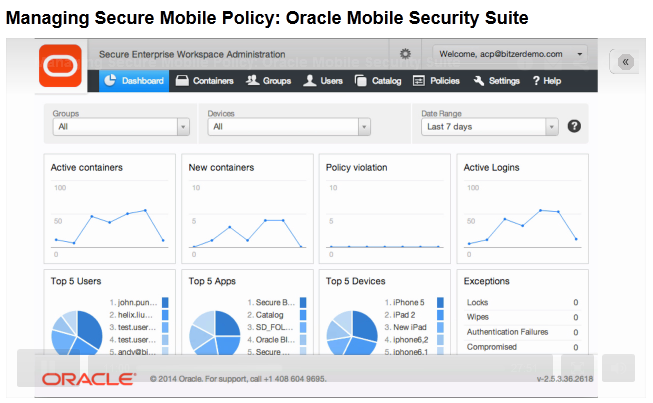
  • Introduces a new concept called the Secure Mobile Workspace which containerizes all corporate applications with a single login .
  • Builds on the BYOD concept where in employees can use their personal devices / phablets to access corporate apps/data.
  • Fine grained policy control using Oracle Mobile Access/Admin Console with new features like geo-fencing , time-bound access to workspace etc.
  • Enterprise wide Identity management solution is extended to mobile devices
  • Oracle API Gateway (OAG) support for RESTful IdM services.
  • DLP Support
  • Core apps for Email, Calendar, Contacts, Tasks, Notes.

4) Oracle Mobile Authenticator

  • Adds strong authentication features for SSO enabled apps
  • Uses changing PIN every 30 seconds for registered apps
  • Integration with OAM
  • Available on Android and iOS

5) Improved & fully integrated OAuth 2.0 Support for authorization -client , server , 2 legged or 3 legged authorization.

6) Automated IdM Suite install
  • 2 hours for single node  , 8 hours for 8 node HA cluster.
  • Patching support
  • Standard builds
  • No additional license needed , feature is supposedly OTB using Wizards and components to be installed can be configured.

General 11gR2 IdM strategy from Oracle
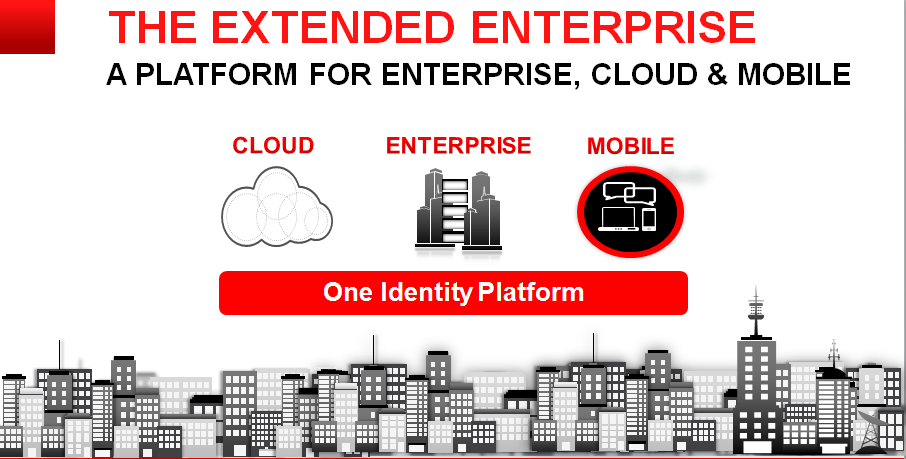
To provide a unified Identity Management platform for Cloud , Enterprise and Mobile Applications.

Useful Links

P.S. Source of images Oracle Webcast , intention only to share the information.

Oracle Mobile Security Suite (OMSS)

Oracle launched OMSS on Feb 26th , 2014 and had a webcast few days back detailing its features. Here are few details - 
Overview -
Oracle Mobile Security Suite (OMSS) addresses the BYOD challenges by isolating corporate from personal data on consumers’ personal mobile devices without
needing to lockdown the entire device.
Oracle’s Mobile Security Container technology protects corporate apps and data and enables a Secure Enterprise Workspace that meets enterprise security
requirements without compromising user experience. It offers the most integrated solution with Windows® authentication and Oracle Access Manager
infrastructure for secure Single Sign-on (SSO) to corporate applications.

The entire solution includes -
1)A BYOD,employee-centric mobile security suite that separates personal apps from secure,“containerized” corporate
,“off-the-shelf” apps and data avoiding device lock-down.Containerized apps are Oracle and/or third -party enterprise
applications accessed by employees through the corporate network(intranet).
2) A consumer - centric mobile and social service that provides a software development kit (SDK) allowing corporate
developers to secure custom enterprise apps for Apple’s iOS and Google’s Android devices, bridging the gap between mobile devices,
social networks, and the enterprise’s backend identity management infrastructure.

Key Identifiers -

1)Comprehensive set of security policies providing strong authentication, encryption and DLP (Data Leak Prevention) controls .
2)Containerization (apps are containerized and only one time login into a container is needed).
2)Secure Enterprise Workspace which houses all the corporate apps.

3)Single Sign-on (SSO) with Integrated Windows Authentication (Kerberos and NTLM) and OAM authentication (Basic Auth and OAuth 2.0) 
4)AppTunnel that eliminates need for mobile VPN and protects from rogue apps.
5)Mobile Security Access Server is located in the DMZ which redirects unauthenticated requests to appropriate Oracle Mobile Security containers.
7)Mobile Security Admin Console for Locking , providing access , remote wipe of corporate container.
8)New and useful features like geo-fencing and time-fencing available in admin console.
9)Leverages the existing IDM Architecture - talks to Directory Services(OID/OUD/AD) , apps can be protected by OAM and/or OIF.


10)Container has OOTB apps like Secure Browser , Catalog , Mail Mgr etc.
11)OMSS can be deployed on Oracle Enterprise Linux or Microsoft Windows.
12)Android 4.x and above including 4.4/KitKat compatibility
13)The Oracle Mobile Security Suite components are distributed across the corporate DMZ and the enterprise intranet (or corporate network)
14)This is a mobile application management (MAM) solution which has various advantages over MDM(Mobile Device Mgmt) solutions like Airwatch
like separate container for coprporate apps , no requirement of device locking , data privacy etc.

Architecture - 
The recently rechristened Oracle MAF is tightly integrated with OMSS.

Useful Links -
P.S. Source of images Oracle Webcast , intention only to share the information.