Facebook

Monday, June 9, 2014

Impersonation feature for WebCenter Spaces 11.1.1.8 with Oracle Acess Mgr(OAM) 11gR2

What is Impersonation ? 
WebCenter Portal Impersonation lets a WebCenter Portal administrator or system administrator assign impersonation rights to a group of users ("impersonators"), such as support representatives or application administrators, so that they can impersonate another Portal user and perform operations as that user ("impersonatees"). This may be useful in the following instances:
  • A customer support representative may want to perform actions as another user in order to understand the issues being faced by that user
  • An administrator may want to perform operations on behalf of a user
  • A company executive may need to delegate someone to act on his or her behalf while away. (Source : Oracle Documentation)



Pre-requisites
1) WebCenter Spaces 11.1.1.8 +
2) Oracle Access Manager(OAM) 11.1.2 (11gR2+)
3) Setups need to be done in OAM , Webcenter Spaces application using EM , and in Oracle Internet Directory(OID) for the users (OID 11.1.1.7+)

Key Advantages -
1) Feature just needs to be configured as mentioned above . Effort is markedly less than implementing this feature in a custom manner using ADF/Web Technologies.
2) Feature once configured along with OAM can be monitored using OAM.
3) Out of the box UI are available and supported by Oracle , hence the solution is standardized.
4)Feature being a very common use case can be used to sell OAM and the Security Team has expertise in implementing it within a cpl of weeks.

Note 
  • After weeks of ado , I have got this up and running in our environments for Webcenter Spaces 11.1.1.8 which is Oracle's new way of developing webcenter portal applications.
  • But for a Custom Portal Application in 11.1.1.8, though Security Taskflows for Impersonation are available in Jdeveloper , Impersonation is not currently supported (Doc ID 1606526.1) but I have an ER open with Oracle [BUG 18882638 - ENABLE IMPERSONATION FOR WEBCENTER CUSTOM FRAMEWORK APS ]

Walkthrough of this new & exciting feaute via screenshots - 
1) Screen in WC Spaces / Custom Portal Security Taskflow to select impersonators. (Validations to prevent users not been setup as Impersonators available Out of the Box).


2) Search Impersonators screen .
Only those users who have been granted Impersonator access in OID can be searched here.


3)Selected Impersonator who can be given access rights for a time duration.


4) Once Switch User Link is clicked ( as in second image above) after logging in with the 

Impersonators credentials , the Impersonator is asked to enter your credentials as under.

5) Once logged in the Impersonation session is in progress. Remember - The impersonatee's credentials were not used at all !
Click on Stop Impersonation to return back 
to the Impersonator's home page.
6) Cool feature  !! Monitor the Impersonation session as an Admin in OAM Console as below

Reference 

Thursday, May 22, 2014

Oracle Identity Mgmt 11gR2 PS2 : New features & Cloud / Mobile Strategy

Source - The live webcast on this topic by Oracle. Here are the updates -

"Oracle IdM R2 PS2 Theme  - Cloud , Mobile , Simplification"

New features in 11gR2 PS2 release  -

1) Cloud Access Portal - a web based application has been added in PS2 release which will enable admins to manage SaaS based cloud applications.
  • The login to each application will be using SSO , form-fill technologies & federation capabilities.UI adapts to  various form factors.
  • OAM Protects the resources
  • When clicked on apps , redirection to logjn page with form fill and auto login.

2)Session Management features in Oracle Privileged Account Manager (OPAM) - 

OPAM is a whole new set of functionality focused on managing administrative passwords for applications, databases and operating systems.

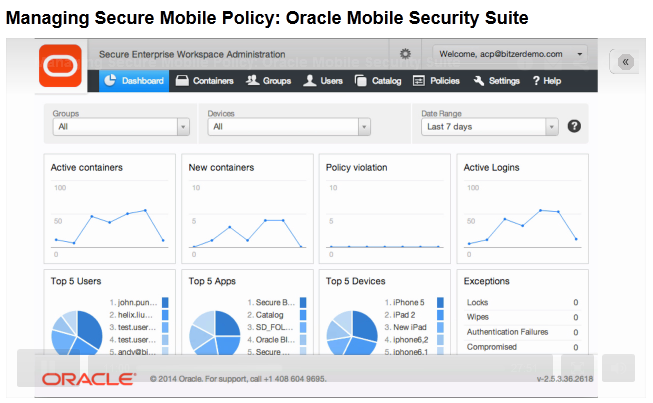
3) Oracle Mobile Security Suite (OMSS) -

This heavily leverages features and concepts from Oracle's Bitzer acquistion . This is a MAM (Mobile Application Management) solution.
  • The onus is on application centric security as opposed to device centric security.
  • Introduces a new concept called the Secure Mobile Workspace which containerizes all corporate applications with a single login .
  • Builds on the BYOD concept where in employees can use their personal devices / phablets to access corporate apps/data.
  • Fine grained policy control using Oracle Mobile Access/Admin Console with new features like geo-fencing , time-bound access to workspace etc.
  • Enterprise wide Identity management solution is extended to mobile devices
  • Oracle API Gateway (OAG) support for RESTful IdM services.
  • DLP Support
  • Core apps for Email, Calendar, Contacts, Tasks, Notes.

4) Oracle Mobile Authenticator

  • Adds strong authentication features for SSO enabled apps
  • Uses changing PIN every 30 seconds for registered apps
  • Integration with OAM
  • Available on Android and iOS

5) Improved & fully integrated OAuth 2.0 Support for authorization -client , server , 2 legged or 3 legged authorization.

6) Automated IdM Suite install
  • 2 hours for single node  , 8 hours for 8 node HA cluster.
  • Patching support
  • Standard builds
  • No additional license needed , feature is supposedly OTB using Wizards and components to be installed can be configured.

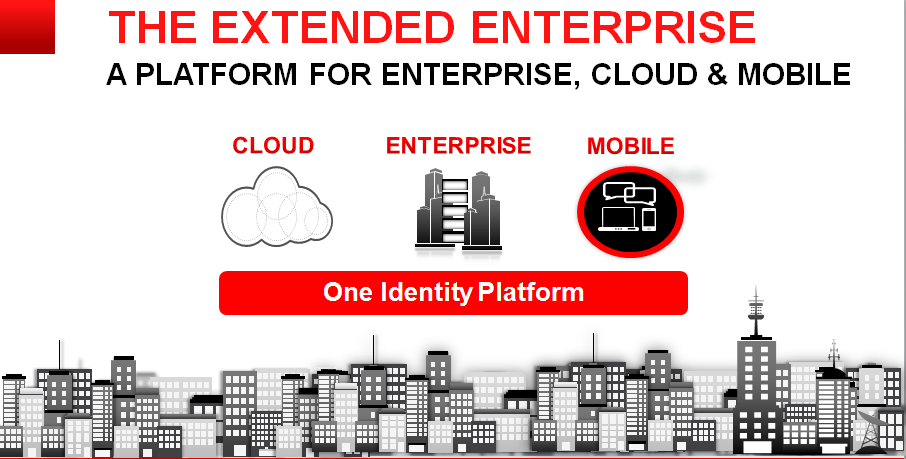
General 11gR2 IdM strategy from Oracle
To provide a unified Identity Management platform for Cloud , Enterprise and Mobile Applications.

Useful Links

P.S. Source of images Oracle Webcast , intention only to share the information.

Oracle Mobile Security Suite (OMSS)

Oracle launched OMSS on Feb 26th , 2014 and had a webcast few days back detailing its features. Here are few details - 
Overview -
Oracle Mobile Security Suite (OMSS) addresses the BYOD challenges by isolating corporate from personal data on consumers’ personal mobile devices without
needing to lockdown the entire device.
Oracle’s Mobile Security Container technology protects corporate apps and data and enables a Secure Enterprise Workspace that meets enterprise security
requirements without compromising user experience. It offers the most integrated solution with Windows® authentication and Oracle Access Manager
infrastructure for secure Single Sign-on (SSO) to corporate applications.

The entire solution includes -
1)A BYOD,employee-centric mobile security suite that separates personal apps from secure,“containerized” corporate
,“off-the-shelf” apps and data avoiding device lock-down.Containerized apps are Oracle and/or third -party enterprise
applications accessed by employees through the corporate network(intranet).
2) A consumer - centric mobile and social service that provides a software development kit (SDK) allowing corporate
developers to secure custom enterprise apps for Apple’s iOS and Google’s Android devices, bridging the gap between mobile devices,
social networks, and the enterprise’s backend identity management infrastructure.

Key Identifiers -

1)Comprehensive set of security policies providing strong authentication, encryption and DLP (Data Leak Prevention) controls .
2)Containerization (apps are containerized and only one time login into a container is needed).
2)Secure Enterprise Workspace which houses all the corporate apps.

3)Single Sign-on (SSO) with Integrated Windows Authentication (Kerberos and NTLM) and OAM authentication (Basic Auth and OAuth 2.0) 
4)AppTunnel that eliminates need for mobile VPN and protects from rogue apps.
5)Mobile Security Access Server is located in the DMZ which redirects unauthenticated requests to appropriate Oracle Mobile Security containers.
7)Mobile Security Admin Console for Locking , providing access , remote wipe of corporate container.
8)New and useful features like geo-fencing and time-fencing available in admin console.
9)Leverages the existing IDM Architecture - talks to Directory Services(OID/OUD/AD) , apps can be protected by OAM and/or OIF.


10)Container has OOTB apps like Secure Browser , Catalog , Mail Mgr etc.
11)OMSS can be deployed on Oracle Enterprise Linux or Microsoft Windows.
12)Android 4.x and above including 4.4/KitKat compatibility
13)The Oracle Mobile Security Suite components are distributed across the corporate DMZ and the enterprise intranet (or corporate network)
14)This is a mobile application management (MAM) solution which has various advantages over MDM(Mobile Device Mgmt) solutions like Airwatch
like separate container for coprporate apps , no requirement of device locking , data privacy etc.

Architecture - 
The recently rechristened Oracle MAF is tightly integrated with OMSS.

Useful Links -
P.S. Source of images Oracle Webcast , intention only to share the information.

Monday, March 10, 2014

Oracle SOA : SFDC Adapter Issue - Total Requests Exceeded

We faced an issue wherein total API calls to SFDC to check for updated accounts exceeded the limit (due to Quartz Scheduler Polling at regular intervals )

Analysis : 
Once limit is reached , this cannot be undone till 24 hours !
Quick Fix : Use a different sandbox if using developer edition of SFDC

Correct way should be to (Work In Progress) -
1)Optimizing API calls to Salesforce.com
Although the Oracle Cloud Adapter for Salesforce.com incorporates several measures to reduce API calls to Salesforce.com (for instance, session management for limiting login calls and cache for limiting metadata fetch calls), you can further reduce calls to Salesforce.com while designing your composites through the offline configuration feature of Oracle Cloud Adapter for Salesforce.com.
2)Use polling interval of Quartz scheduler in couple of minutes than seconds.

Getting Started with BPM 11g